About Me

I’m Aleksandar,
founder of Contractor
Profit Guard.

Through experience with people who run projects, I noticed how easily profit can start to weaken while the job is still underway — often before the contractor clearly sees it.

That is exactly why I came up with the idea to develop CPG — a simple tool that allows contractors to track costs, margin, change orders and profit in one place. I did not want another complicated system, but a tool that gives a clearer view and greater control over what is happening with your projects, so you can spot problems earlier and protect profit before you realize things are no longer going the way you planned.

Clearer numbers Real-time control Fewer surprises Better profit visibility
Aleksandar, founder of Contractor Profit Guard
AleksandarFounder — Contractor Profit Guard

The full founder story is one click away.

If you want to know why I started building Contractor Profit Guard, read it there. If you are here for the product, keep going — this is the problem it was built to solve.

Learn More About Me

Profit rarely disappears all at once. It gets chipped away while the job keeps moving.

A job can be priced well and still finish weaker than expected. Not because the contractor cannot do the work, but because the financial picture keeps changing while attention is on crews, deadlines, clients, materials and getting the job done.

01Material costs land higher than the estimate.
02Labor takes longer than the job allowed for.
03Extra work gets done before it is fully tracked or priced.
04Several small changes quietly reduce the margin you expected.
One small change is manageable. Several unnoticed changes can rewrite the profit.That is the gap Contractor Profit Guard is built to help you see earlier.

CPG does not tell you how to run the job. It gives pricing, costs, changes, margin and profit one place to stay connected while the project is moving.


That is why I wanted the important numbers in one place.

Pricing. Costs. Change orders. Margin. Profit.

Instead of keeping each part somewhere different and trying to rebuild the story later, CPG connects the job-profit workflow from one starting point.

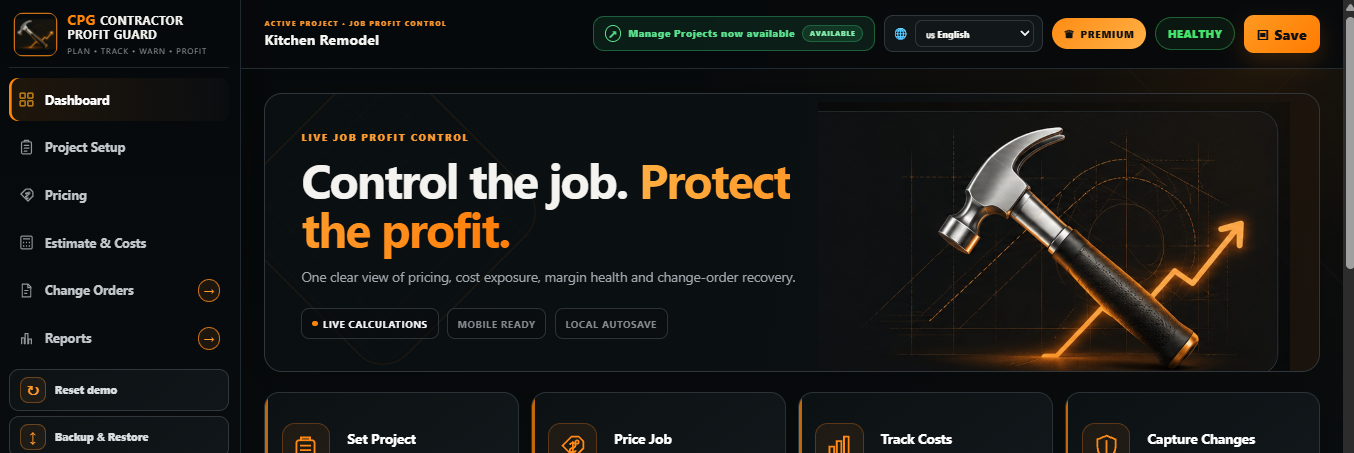
The dashboard is where you enter the job and move into the part you need next — project setup, pricing, costs, change orders, reports or profit control, depending on your plan.

Know where your project is heading — before it is too late to influence the outcome.
View plans
Contractor Profit Guard dashboard
Actual Contractor Profit Guard dashboard — the starting point of the job-profit workflow.
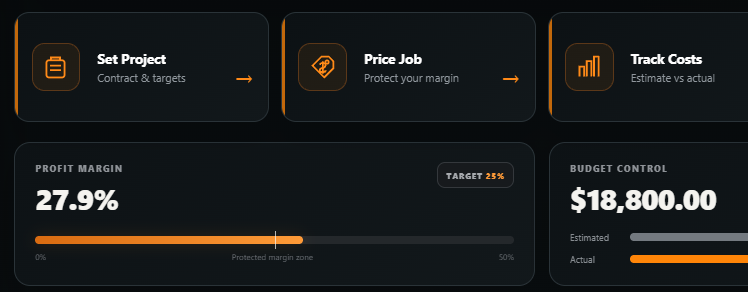
Real Contractor Profit Guard profit and budget controls
Actual CPG profit and budget view showing how project figures are organized.

A number is only useful if it helps you understand the job.

When you enter and update project data, CPG keeps the important pieces tied together so you can compare what you planned with what is actually happening.

Planned vs. actual costsSee where the job is moving away from the estimate.
Margin visibilitySee how cost changes affect the margin you are working toward.
Change-order controlKeep extra work visible instead of letting it disappear inside the job.
Connected job viewPricing, costs, changes and profit stay part of the same picture.
The goal is not more data. The goal is earlier clarity.
CPG is a job-profit control workspace. It does not replace your accountant or bookkeeping system.

The best time to discover a profit problem is while you can still do something about it.

A project can look busy and productive while the margin is getting weaker underneath it. CPG is built to keep that financial picture visible early enough for you to make your own decision before the job is closed out.

01See the changeKnow when costs, margin or extra work start moving away from the plan.
02Understand the impactSee how those changes affect the financial result of the job.
03Decide earlierUse that clearer picture while the project is still in your hands.
You work too hard to reach closeout and only then learn that the margin slipped weeks earlier.
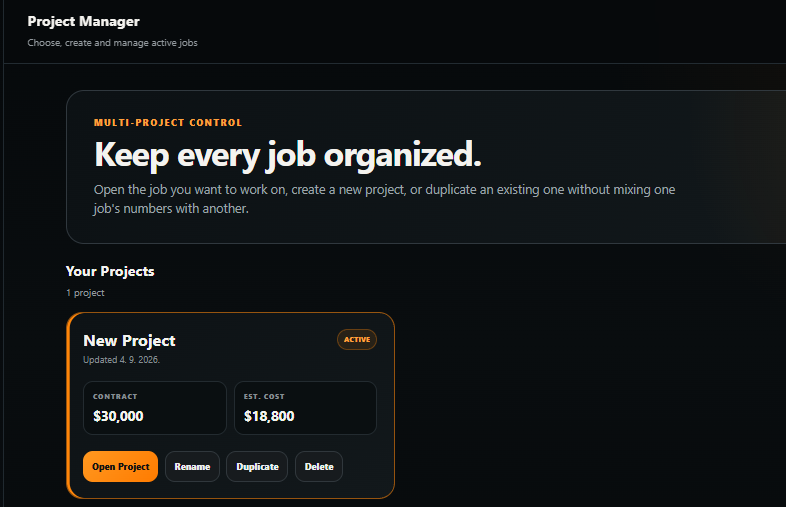
Real Contractor Profit Guard Project Manager
Project Manager is available in PREMIUM for contractors managing multiple jobs.

Keep every project separate without losing the bigger picture.

If you manage more than one job, PREMIUM adds Project Manager so each project keeps its own pricing, costs and status while remaining easy to open and manage.

Separate project recordsEach job keeps its own financial picture.
Quick project switchingMove between jobs without rebuilding the workspace.
Backup & restoreKeep a portable backup of your project data.

If you want this level of visibility on your jobs, the only question left is how much control you need.

Start with the essentials, add change-order control, or unlock the full multi-project workspace.

COREI need the essentials: pricing, costs and profit visibility.
PROI deal with extra work, changes and margin pressure.
PREMIUMI run multiple jobs and want the complete workspace.

CORE

Essentials

For contractors who want clean job setup, pricing, cost tracking and profit visibility without extra complexity.

$29/ month
Simple month-to-month access.
Start with CORE
Includes
  • Project setup & pricing
  • Job cost tracking
  • Profit dashboard & status visibility
  • Change Orders
  • Reports
  • Manage multiple projects
Best for: solo contractors and straightforward job tracking.

PREMIUM

Full Control

For contractors who want the complete CPG workspace, reports and separate control across multiple jobs.

$89/ month
Simple month-to-month access.
Get Full Control
Everything in PRO, plus
  • Reports
  • Manage Projects workspace
  • Multiple-project control
  • Full current CPG feature access
Best for: contractors running several jobs and wanting full visibility.

From checkout to your workspace in three steps.

01

Choose your plan

Select Monthly or Annual and complete the secure Lemon Squeezy checkout.

02

Receive your license

Your plan is tied to the license issued for your purchase.

03

Activate CPG

Open Contractor Profit Guard, enter your purchase email and license key, and start working.

See exactly what each plan unlocks.

FeatureCOREPROPREMIUM
Project Setup & Pricing
Cost Tracking
Profit Dashboard
Change Orders
Reports
Manage Projects
Monthly$29$59$89
Annual$290$590$890

Know what you are getting.

Is CPG accounting software?

No. CPG is focused on job-level pricing, costs, margin, change orders and project-profit control. It is designed to complement—not replace—your accounting or bookkeeping process.

Does CPG automatically pull my bank or accounting data?

No. You enter and update the project numbers you want CPG to track. CPG then calculates and organizes the job picture inside the workspace.

Which plan should I start with?

CORE is for essentials. PRO is the best fit when change orders and job changes matter. PREMIUM is for reports and contractors managing multiple projects.

What happens after checkout?

You receive a license for the plan you purchased. Open CPG, enter your purchase email and license key, and the app verifies your access securely.

Why is Annual cheaper than paying monthly for 12 months?

Annual pricing includes the equivalent of 2 months free: CORE $290, PRO $590 and PREMIUM $890 per year.

Can I see the real product before choosing?

Yes. The product screens shown on this page are captured from the actual Contractor Profit Guard application—not generic mockups.

Do not wait until the job is over to find out what happened to the profit.

Choose the level of control that fits your work today, then use CPG to keep the job numbers visible while you can still act on them.

Choose My Plan

Already purchased?

Open Contractor Profit Guard and activate your license securely.

Open CPG